

In this article: A practical breakdown of every home theater seating feature — what each one actually does, how it affects long viewing sessions, and how to prioritize them for your budget.
- Power Recline — The Baseline
- Power Headrest — The Most Impactful Upgrade
- Power Lumbar — Underrated and Underexplained
- Heat — You Will Use It Every Session
- Massage — What to Actually Expect
- USB Charging, LED Lighting, and Everything Else
- How to Prioritize Features for Your Budget
- Frequently Asked Questions
Not every feature on a theater seat spec sheet is worth the same — power headrest and heat are used in almost every session; massage and ambient lighting are nice additions but rarely the deciding factor. Knowing which features change the experience and which are easy to live without is the fastest way to build a configuration you won't regret.

This guide covers each feature in the order it actually matters — starting with what every power seat should do, working through the upgrades worth prioritizing, and ending with a practical framework for matching features to your budget and how you use the room.
Quick Takeaways
• Power recline is the baseline, not an upgrade.
Manual recline in a dark room is awkward. Power recline is the minimum expectation for dedicated theater seating.
• Power headrest is the feature that converts the most skeptics.
Once you've used an adjustable headrest for long sessions, fixed headrests feel like a compromise.
• Heat is used every session; massage is used occasionally.
Budget accordingly — heat is a daily feature, massage is a bonus.
• USB charging belongs in the armrest, not on a power strip on the floor.
It's a small thing that makes the room feel finished.
• Don't add features you can't configure from the seat.
Buttons buried in the base or accessible only by leaning forward undermine the whole point of the chair.
1. Power Recline — The Baseline

Power recline is the foundation. If you're buying dedicated theater seating, this is not an upgrade — it's the expectation. Manual recline (push-back or lever) is awkward to operate in low light, often jolts the person next to you, and rarely lands exactly where you want it.
Power recline means one button press, a smooth and quiet motor, and infinite stopping points across the full recline arc. Independent footrest and backrest control (available on premium configurations) lets you find your exact position without compromising either end.
What to look for
• Smooth, quiet motor: No grinding or clicking. You should barely notice it running during a film.
• Independent footrest control: Separating footrest and backrest adjustment lets each viewer find their own position. Linked control is fine for casual use; independent is noticeably better for long sessions.
• Wide recline arc: The best seats recline from fully upright to nearly flat, with comfortable positions across the range — not just at the extremes.
2. Power Headrest — The Most Impactful Upgrade

This is the feature that converts the most skeptics. As you recline, your head wants to fall back — but the screen is in front of you, not above you. Without a power headrest, you're either straining your neck forward or propping yourself up with pillows.
A power headrest adjusts the head and neck support independently of the backrest angle. Recline fully and tilt the headrest forward to bring your line of sight level with the screen. It solves the neck strain problem completely, and it's nearly impossible to go back to a fixed headrest once you've used one through a two-hour film.
Why it matters more on longer sessions
• 45-minute viewing: Neck position is manageable without adjustment.
• 2-hour film: Neck strain from a fixed reclined headrest becomes noticeable in the second half.
• 3+ hours or a full series run: Power headrest is essentially required for sustained comfort.
3. Power Lumbar — Underrated and Underexplained

Power lumbar is the feature most people don't think about until they use it — and then consistently say they wish they'd known to prioritize it earlier.
The lower back changes position as you recline. At a shallow recline, you may want more lumbar support. Fully reclined, you want it softer. Power lumbar lets you adjust the pressure at the lower back independently, so the support contours to your posture rather than fighting it.
Who benefits most
• People who experience lower back tightness during long sitting sessions — The lumbar can be dialed in rather than compensated for with posture adjustment.
• Multiple users in a household — Different people have different lumbar needs. A single fixed lumbar support is a compromise for everyone.
• Anyone who also uses the room for gaming or work viewing — Lumbar matters more when you're in an active, upright position rather than fully reclined.
Fixed vs. adjustable lumbar
Fixed lumbar is a foam pad built into the seat back at a set position and pressure. It works well for one body type at one recline angle. Power lumbar uses a motor to adjust the depth of the support — you can feel the difference immediately when you dial in your preferred setting.
4. Heat — You Will Use It Every Session

Heat is one of the most consistently used features on any premium theater seat — more consistently than massage, more often than ambient lighting. The reason is simple: leather furniture in an air-conditioned room can feel cold, especially during the first 10–15 minutes of a session. Seat heat eliminates that entirely.
Most seat heat systems use low-wattage elements in the seat cushion and lower back panel. They warm to a comfortable temperature within 2–3 minutes and draw very little power. Heat is typically controlled from the same armrest button panel as recline.
Heat vs. massage: where to spend first
| Feature | Usage frequency | Best for |
|---|---|---|
| Seat heat | Most sessions | Anyone in a climate-controlled room; especially useful in winter months |
| Massage (vibration) | Occasionally | Relaxation during longer sessions; not therapeutic, but pleasant |
If you're choosing between heat and massage in a budget decision, heat wins. You'll use it in almost every session. Massage is a nice addition once you have everything else.
5. Massage — What to Actually Expect

Seat massage on home theater chairs uses vibration motors — typically two or four motors distributed through the seat cushion and back panel. The effect is a gentle pulsing sensation, similar to a car seat massager or a vibrating massage pad.
This is relaxation, not therapy. Don't expect the same effect as a professional massage or a dedicated massage chair with roller mechanisms. What seat massage does well: provides a pleasant background sensation during long viewing sessions, helps some people relax into the seat more quickly, and is a feature that guests reliably notice and enjoy.
Massage settings to look for
• Multiple intensity levels — single-intensity massage often feels too strong or too weak. Three or more levels lets you find a comfortable setting.
• Zone control — seat and back independently adjustable is better than all-or-nothing.
• Auto-off timer — massage that runs indefinitely can become more irritating than relaxing after 20 minutes. Auto-off after 15–20 minutes is standard on quality seats.
6. USB Charging, LED Lighting, and Everything Else

USB charging
Built-in USB charging in the armrest is a small feature with outsized daily utility. Everyone's phone ends up in the theater room. Having a charging port in the armrest rather than on a power strip on the floor is a detail that makes the room feel finished. USB-A is standard; USB-C is available on newer configurations. Worth having on every seat that will be used regularly.
LED ambient lighting
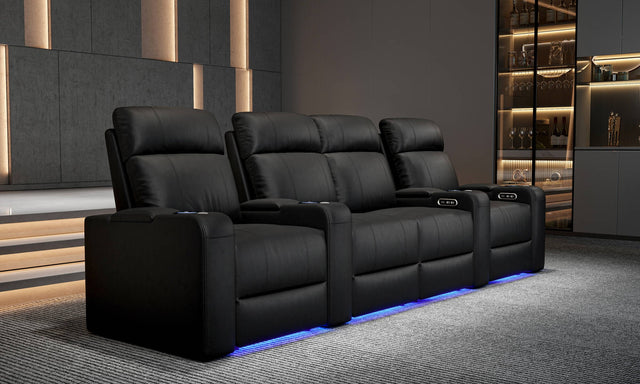
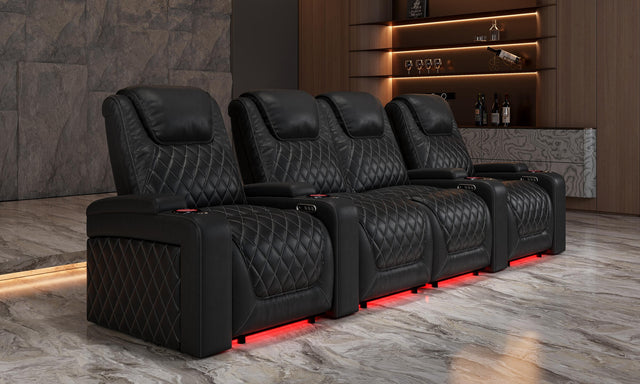
Under-seat or under-armrest LED strips provide low-level ambient light for the room during viewing. At a practical level, they make it easier to find things in the dark without reaching for a phone. Aesthetically, they contribute to the cinema atmosphere. If your theme design includes this, it's worth adding — the cost difference is small and the visual effect in a dark room is significant.
Chaise extender / leg rest extension
A manual or power extension that lengthens the leg rest beyond the standard footrest position. Taller viewers (6'1"+) benefit most — it eliminates the gap between the footrest edge and the calf. For average-height viewers, it's a nice extra rather than a necessity.
Console options
Center consoles between seat positions typically include cup holders, covered storage (for remotes, snacks), and USB ports. They replace the gap between armrests and serve as a shared surface. Most useful in row-of-3 or larger configurations where the center position is occupied. A console row costs more than a standard row — confirm the trade-off is worth it for your configuration. See the How to Choose Home Theater Seats guide for more on row configurations.
7. How to Prioritize Features for Your Budget

When every feature is available and budget is the constraint, here's how to rank them:
| Priority | Feature | Reason |
|---|---|---|
| 1 — Essential | Power recline | The baseline for dedicated theater seating |
| 2 — High impact | Power headrest | Changes long-session comfort significantly; hard to retrofit |
| 3 — High impact | Power lumbar | Especially valuable for multiple users or lower back sensitivity |
| 4 — Used daily | Seat heat | Consistently used; higher frequency than any other premium feature |
| 5 — Good addition | USB charging | Small cost, high daily utility |
| 6 — Nice to have | Massage | Pleasant but occasional use; not worth prioritizing over 1–4 |
| 7 — Aesthetic | LED lighting | Adds atmosphere; worth it at low price delta |
For more on how features interact with seat configuration and leather grade decisions, see the Complete Guide to Home Theater Seating.
Frequently Asked Questions
Is power headrest worth the upgrade cost?
For most buyers who use their theater room regularly, yes. The neck strain problem in a reclined fixed-headrest seat becomes more noticeable the longer the session. Power headrest solves it completely. It's the feature people most consistently say they wish they'd prioritized earlier. See How to Choose Home Theater Seats for more context.
What's the difference between seat heat and a heated blanket?
Seat heat warms the leather surface directly from below — it's uniform, hands-free, and controlled from the armrest. A blanket is fine for the top half; seat heat addresses the cold leather contact your back and legs feel when you first sit down, which a blanket doesn't reach.
Can I get massage in theater seating without a full massage chair?
Yes. Many premium theater seats include vibration massage motors. This is a different experience from a massage chair's roller mechanism — it's more of a gentle vibrating sensation than a kneading massage. It's pleasant for relaxation but not therapeutic. For a dedicated massage experience, a separate massage chair is the better option.
Do all seats in a row need to have the same features?
For most Valencia configurations, a row is purchased as a unit — all seats in the row share the same feature set. This ensures consistent controls and a uniform appearance. If you need different feature levels in the same room, that's typically achieved with different rows (e.g., a premium back row and a standard front row).
What features are hardest to add later?
Power headrest and power lumbar are built into the seat's mechanism — they can't be retrofitted to a seat that wasn't built with them. LED lighting and USB charging are sometimes available as accessories but are cleaner when built in. The practical answer is: buy the features you want from the start, because adding them later usually means replacing the seat.
How do I control the features — is there a remote?
Most Valencia theater seats use a wired control panel built into the armrest — easy to find in the dark without looking for a separate remote. Controls typically include recline, footrest, headrest, lumbar, heat, and massage settings, all accessible with a single hand without leaving the reclined position.
Is Italian Nappa leather worth the upgrade for features?
Italian Nappa leather is a material upgrade, not a feature upgrade — it doesn't change how the seat operates. But it affects how heat feels (warmer, more supple), how the seat ages, and the overall tactile experience. For 10+ year ownership in a dedicated room, the leather grade matters. See What Is Italian Nappa Leather for a full breakdown.
Which Valencia seat has the most complete feature set?
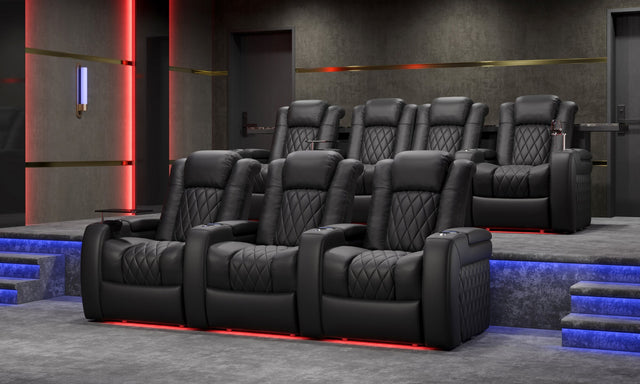
The Tuscany Ultimate configuration includes power recline, power headrest, power lumbar, heat, massage, USB charging, and LED lighting — the full feature set in Italian Nappa leather. For a comparison of Tuscany, Oslo, and Barcelona Grand across features and leather grades, see Tuscany vs. Barcelona vs. Oslo.